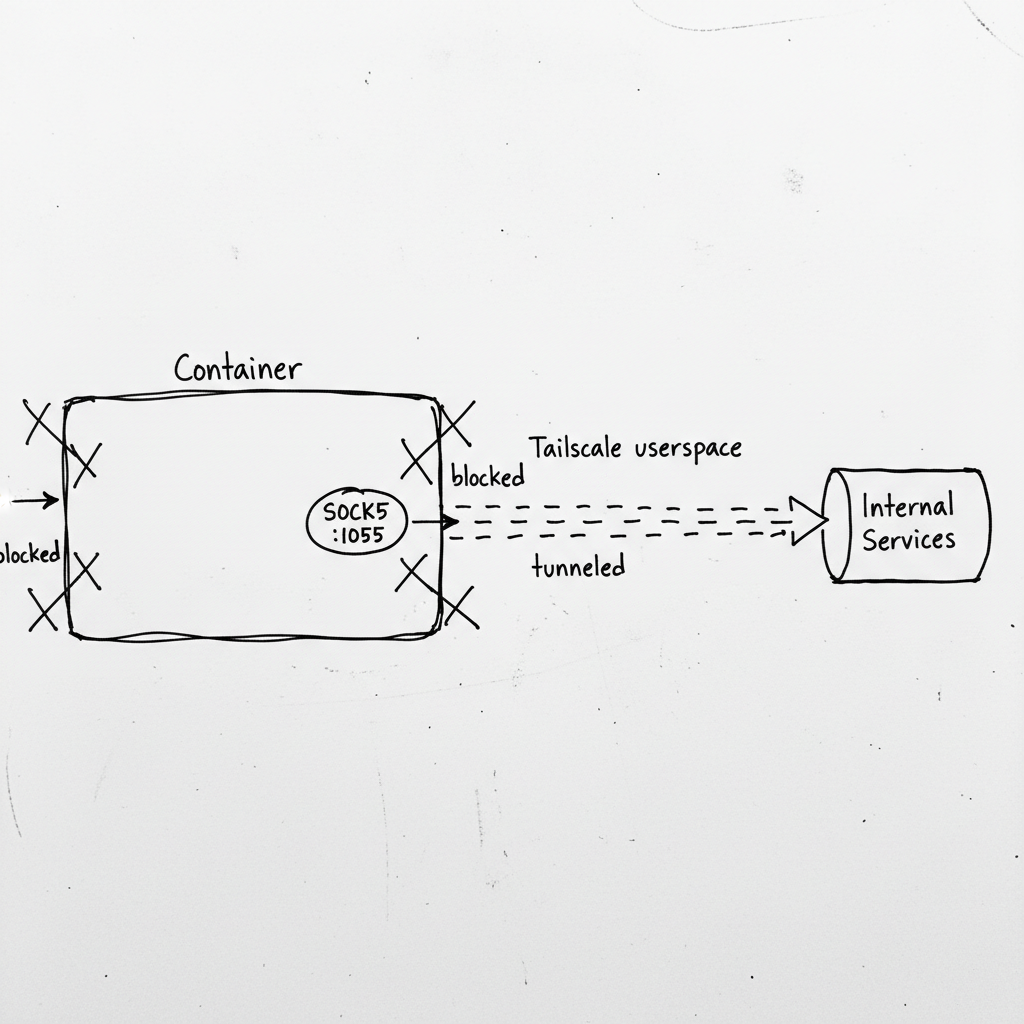
I rented a GPU on vast.ai. Great price, fast hardware. The worker code deployed. Then it tried to connect to RabbitMQ on my home network.
Connection refused.
The container was running in Docker on the host machine. No --net=host. No exposed ports. Just an isolated network namespace with no route to my internal services.
The only thing that worked was Tailscale—but even that needed special handling. Normal Tailscale creates a TUN device. Docker containers can't create TUN devices without elevated privileges. And vast.ai doesn't give you elevated privileges.
So Tailscale ran in "userspace networking" mode. It worked. The container got a Tailscale IP. But here's the catch: userspace networking doesn't modify the routing table. Applications can't just "connect out" through Tailscale. They have to be explicitly configured to use it.
The solution: SOCKS5 proxy. Tailscale's userspace mode exposes a SOCKS5 server. Route your traffic through that, and it exits through the Tailscale network instead of the container's isolated namespace.
The Setup
First, run Tailscale in userspace mode with SOCKS enabled:
# Inside the container startup script
tailscaled --tun=userspace-networking --socks5-server=127.0.0.1:1055 &
tailscale up --authkey=$TAILSCALE_AUTHKEY --hostname=worker-$(hostname)
Now there's a SOCKS5 proxy at 127.0.0.1:1055. Any traffic routed through it exits via your Tailscale network, reaching your internal services.
Routing HTTP Through SOCKS
For HTTP traffic (image downloads, API calls), I use httpx with a SOCKS transport:
import httpx
from httpx_socks import AsyncProxyTransport

transport = AsyncProxyTransport.from_url("socks5://127.0.0.1:1055")

async with httpx.AsyncClient(transport=transport) as client:
    response = await client.get("http://internal-service.example.com/api")
Every request goes through the SOCKS proxy, which tunnels it through Tailscale. The internal service sees a connection from my Tailscale IP, not from some random GPU rental datacenter.
Routing AMQP Through SOCKS
RabbitMQ uses AMQP, not HTTP. Different protocol, different approach.
The aio-pika library doesn't support SOCKS directly. But Python's socket module can be monkey-patched to route all connections through SOCKS:
import socket
import socks

# Configure default proxy for all socket connections
socks.set_default_proxy(socks.SOCKS5, "127.0.0.1", 1055)
socket.socket = socks.socksocket

# Now aio-pika uses SOCKS without knowing it
connection = await aio_pika.connect_robust(
    "amqp://user:pass@internal-rabbitmq.example.com:5672/vhost"
)
The monkey-patch is global—every socket connection goes through SOCKS after this. For a dedicated worker that only talks to internal services, that's exactly what I want.
The Localhost Trap
Here's a bug that cost me an hour: localhost traffic was going through the proxy too.
I had a health check that hit http://localhost:8000. After setting up SOCKS, it started failing. Why? The SOCKS proxy tried to route localhost through Tailscale. But localhost on the Tailscale network isn't localhost on the container.
The fix: bypass SOCKS for localhost:
def get_transport(url: str):
    """Use SOCKS for external connections, direct for localhost."""
    if "localhost" in url or "127.0.0.1" in url:
        return None  # Use default transport
    return AsyncProxyTransport.from_url("socks5://127.0.0.1:1055")
Or for the socket monkey-patch approach, install the patch selectively:
# Only patch when connecting to external services
original_socket = socket.socket

def conditional_socket(*args, **kwargs):
    # Check if we're connecting to localhost
    # If so, use original socket
    # Otherwise, use SOCKS socket
    ...
In practice, I just don't run local services in these workers. Everything they need is remote, accessed through SOCKS.
Why Not Just Use --net=host?
Good question. If the container had host networking, it could reach anything the host can reach. No SOCKS needed.
But I don't control the container configuration. Vast.ai (and similar GPU rental platforms) run your code in sandboxed containers. They don't give you --net=host because that would let you sniff the host's network traffic, access other tenants' services, and generally cause havoc.
SOCKS is the escape hatch they left open. Your container can make outbound connections. You just have to route them through the proxy.
The Full Pattern
# Startup script (bash)
#!/bin/bash

# Install Tailscale if not present
curl -fsSL https://tailscale.com/install.sh | sh

# Start Tailscale in userspace mode with SOCKS
tailscaled --tun=userspace-networking --socks5-server=127.0.0.1:1055 &
sleep 2

# Connect to tailnet
tailscale up --authkey=$TAILSCALE_AUTHKEY --hostname=gpu-worker-$RANDOM

# Wait for connection
sleep 5

# Verify connectivity
tailscale status

# Start the worker
python worker.py
# worker.py
import os
import socket
import socks

SOCKS_PROXY = os.getenv("SOCKS_PROXY", "127.0.0.1:1055")

def setup_socks():
    """Route all socket connections through SOCKS5."""
    host, port = SOCKS_PROXY.split(":")
    socks.set_default_proxy(socks.SOCKS5, host, int(port))
    socket.socket = socks.socksocket

setup_socks()

# Now all connections go through Tailscale
# RabbitMQ, HTTP APIs, database connections—all tunneled
What I Got Wrong Initially
I didn't wait for Tailscale to connect. The startup script ran tailscale up and immediately started the worker. But Tailscale takes a few seconds to establish the connection. First few connection attempts failed. Now I add a sleep 5 and verify with tailscale status.
I forgot to install the SOCKS library. python-socks isn't installed by default. The import failed, the worker crashed. Now it's in the pip install list:
subprocess.run([sys.executable, "-m", "pip", "install", "-q",
    "httpx-socks", "python-socks[asyncio]"
])
Connection timeouts were too short. SOCKS adds latency. A connection that takes 100ms direct might take 300ms through SOCKS. I increased timeouts from 10s to 30s for initial connections.
I didn't handle proxy failures. If Tailscale crashes, the SOCKS proxy dies. Every subsequent connection fails. Now I check proxy health on startup:
def verify_socks_proxy():
    """Verify SOCKS proxy is running."""
    try:
        s = socks.socksocket()
        s.settimeout(5)
        s.connect(("8.8.8.8", 53))  # Try to reach external DNS
        s.close()
        return True
    except Exception as e:
        print(f"SOCKS proxy not working: {e}")
        return False
Alternatives I Considered
SSH tunnel: Classic approach. SSH to a bastion, forward ports. But it requires maintaining the SSH connection, handling reconnects, and managing port mappings. SOCKS is simpler for dynamic connections.
WireGuard: Fast, lightweight VPN. But like Tailscale's normal mode, it needs TUN device access. Doesn't work in restricted containers.
Ngrok/Cloudflare Tunnel: Expose internal services publicly. But then they're public. I didn't want my RabbitMQ accessible from the internet, even with auth.
Just use public endpoints: Route everything through public APIs. But that adds latency, costs, and complexity. My internal services are already there. I just need to reach them.
Tailscale + SOCKS5 hit the sweet spot: private networking, no TUN required, works in sandboxed containers.
The Checklist
If you implement this:
- Run Tailscale with
--tun=userspace-networking --socks5-server=127.0.0.1:1055 - Install SOCKS client libraries (
httpx-socks,python-socks) - Route HTTP traffic through SOCKS transport
- Monkey-patch socket for non-HTTP protocols (AMQP, database, etc.)
- Bypass SOCKS for localhost connections
- Wait for Tailscale to connect before starting the worker
- Verify SOCKS proxy health at startup
- Increase connection timeouts to account for SOCKS latency
- Handle proxy failures gracefully (retry, alert, exit)
- Log what's happening (SOCKS enabled, Tailscale status, connection attempts)
When NOT to Use This
- You control the container configuration. If you can use
--net=hostor create TUN devices, do that. It's simpler. - Public endpoints are acceptable. If your services can be exposed publicly (with auth), you don't need private networking.
- Latency is critical. SOCKS adds ~50-200ms per connection. For high-frequency requests, that adds up.
- The platform blocks outbound SOCKS. Some environments restrict outbound connections. SOCKS won't help if port 1055 is blocked.
The Takeaway
Sandboxed containers are frustrating. You can see your internal network from the host, but the container can't reach it. Every platform has different restrictions, and most don't give you the privileges you need for a proper VPN.
But SOCKS5 is the universal escape hatch. Almost every platform allows outbound TCP connections. Run your VPN in userspace mode, expose a SOCKS proxy, route your traffic through it. The container stays sandboxed. Your traffic stays private. Everyone's happy.
The pattern: when you can't modify the network, route through the network. Tailscale's userspace mode plus SOCKS5 gives you private networking without privileged access. It's not elegant, but it works—and sometimes that's all that matters.
Where This Applies
- GPU rental platforms (vast.ai, RunPod, Lambda Labs)
- Sandboxed CI/CD runners
- Kubernetes pods with network policies
- Docker containers without
--net=host - Any environment where you need private networking but can't modify routing