The error was cryptic: CUDA error: out of memory.
I checked the GPU. Plenty of VRAM available—16GB, only 4GB used by the model. Plenty of headroom.
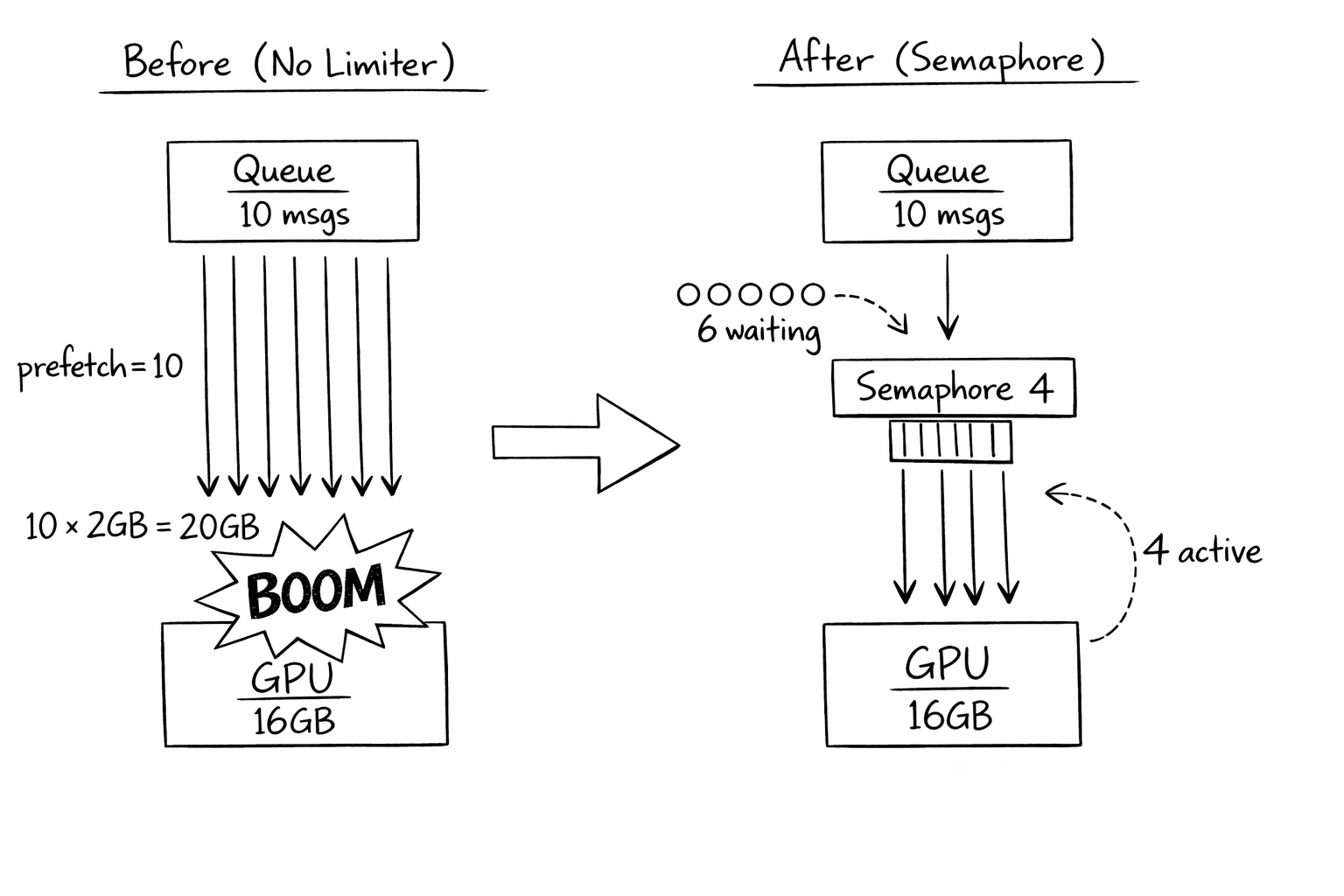
Then I looked at the process list. Ten inference requests were running simultaneously. Each one needed 2GB of working memory for batch processing. Ten times two is twenty. I had sixteen.
The math didn't work. And nothing had told it to.
The Setup
I was using a message queue with prefetch. Standard pattern: pull multiple messages at once, process them in parallel, acknowledge when done. More throughput. Less idle time.
consumer = queue.subscribe(prefetch=10)
for message in consumer:
    async process(message)  # Fire off 10 at once
This works great for CPU-bound work. Ten web requests? Ten database queries? No problem. The OS handles scheduling. Memory is cheap. Add more threads.
But GPU memory isn't like CPU memory. You can't swap it out. You can't page it. When it's full, it's full. And my code was pulling 10 messages, starting 10 GPU operations, and exploding.
The Naive Fix (And Why It Wasn't Enough)
First attempt: reduce prefetch to 1.
consumer = queue.subscribe(prefetch=1)
This "fixed" the OOM. But now I was processing one message at a time. My GPU was 90% idle. Throughput tanked.
The problem: prefetch controls how many messages the queue gives me. But it doesn't know anything about my GPU. Setting prefetch to 4 (the GPU limit) was a coincidence—if my model changed to need 3GB per request, I'd need to remember to update prefetch.
And prefetch affects queue behavior in other ways. If I can't process fast enough, I'm holding messages hostage. Other consumers can't take them. Setting prefetch based on GPU constraints was mixing concerns.
The Realization
I needed to decouple two things:
- Message acquisition — how many messages I pull from the queue
- Concurrent processing — how many I actually process at once
The queue should give me messages as fast as I can handle them. But I should control how many actually run in parallel.
Enter the semaphore:
MAX_CONCURRENT = 4  # Based on GPU memory budget
semaphore = Semaphore(MAX_CONCURRENT)

consumer = queue.subscribe(prefetch=10)  # Queue behavior unchanged

async process_with_limit(message):
    async with semaphore:  # Blocks if 4 are already running
        await gpu_inference(message)

for message in consumer:
    async process_with_limit(message)  # At most 4 run at once
Now I can prefetch 10 messages (keeping the queue happy), but only 4 process simultaneously (keeping the GPU happy). When one finishes, the next waiting message starts.
The Budget Calculation
How did I know "4" was the right number?
I did the math:
- GPU VRAM: 16GB
- Model loaded: 4GB
- Working memory per inference: 2GB
- System overhead: 2GB
- Available for batches: 16 - 4 - 2 = 10GB
- Max concurrent: 10GB ÷ 2GB = 5, but round down for safety → 4
I also added monitoring to validate:
process_with_limit(message):
    async with semaphore:
        log_gpu_memory("before inference")
        result = await gpu_inference(message)
        log_gpu_memory("after inference")
If "before inference" ever showed <2GB free, I'd know my budget was wrong.
What I Got Wrong Initially
I hardcoded the limit. When I upgraded to a 24GB GPU, I forgot to update MAX_CONCURRENT. I was leaving 8GB unused. Now I calculate it from available memory:
available_vram = get_gpu_memory() - MODEL_SIZE - SYSTEM_OVERHEAD
MAX_CONCURRENT = available_vram // MEMORY_PER_REQUEST
I didn't account for variable-size inputs. Some images were bigger than others. Small images needed 1GB working memory; large ones needed 4GB. With MAX_CONCURRENT=4 and four large images, I still OOM'd.
I switched to a memory-tracking semaphore:
memory_pool = MemoryPool(max_bytes=10GB)

process(message):
    estimated_memory = estimate_memory(message.image_size)
    async with memory_pool.acquire(estimated_memory):
        await gpu_inference(message)
Now concurrency adapts to the actual workload. Four small images? All run. Two large images? Only two run.
I forgot about timeouts. If a request hangs, it holds the semaphore forever. Other requests queue up. Eventually the consumer looks dead even though it's just blocked.
async with semaphore:
    try:
        result = await asyncio.wait_for(gpu_inference(message), timeout=300)
    except TimeoutError:
        log("Inference timed out, releasing semaphore")
        raise
I didn't handle semaphore exhaustion gracefully. When all 4 slots were full and more messages arrived, they'd queue in memory. During traffic spikes, that queue grew unbounded. I added backpressure:
try:
    await asyncio.wait_for(semaphore.acquire(), timeout=10)
except TimeoutError:
    # All slots full for 10 seconds - reject the message for retry
    message.nack(requeue=True)
    return
If I can't get a slot within 10 seconds, I reject the message. It goes back to the queue for another consumer (or for me later). This prevents memory blowup from unbounded internal queuing.
The Pattern Generalized
RESOURCE_BOUNDED_CONSUMER:
    resource_limit = calculate_limit_from_hardware()
    semaphore = Semaphore(resource_limit)

    consumer = queue.subscribe(prefetch=resource_limit * 2)

    process(message):
        try:
            await semaphore.acquire(timeout=BACKPRESSURE_TIMEOUT)
        except Timeout:
            message.reject(requeue=True)
            return

        try:
            result = await process_with_timeout(message)
            message.ack()
        except Timeout:
            message.reject(requeue=True)
        finally:
            semaphore.release()
The key insight: prefetch is about queue behavior, semaphore is about resource behavior. Set them independently.
The Checklist
If you implement this:
- Identify your limiting resource (GPU VRAM, file handles, connections, etc.)
- Calculate maximum concurrency from resource budget, not guessing
- Use semaphores to enforce concurrency independent of prefetch
- Add timeouts to prevent hung requests from blocking forever
- Implement backpressure for when the semaphore is exhausted
- Monitor actual resource usage to validate your budget
- Recalculate limits when hardware changes
- Consider variable-size workloads (memory-tracking pools)
- Log when backpressure kicks in—it means you're at capacity
When NOT to Use This
- CPU-bound work with spare memory. If memory isn't the constraint, prefetch alone is simpler.
- Single-threaded processing. If you're not doing anything concurrent, there's nothing to limit.
- When the queue handles backpressure. Some queues have built-in consumer rate limiting. Use that instead.
- Uniform workloads with predictable size. If every request uses exactly the same resources, static limits are fine.
The Takeaway
For years, I thought concurrency limits were about CPUs. How many threads can run? How many cores do I have? The OS handles the rest.
But GPU memory doesn't work that way. Network connections don't work that way. File handles don't work that way. Any constrained resource that can't be swapped or paged needs explicit management.
The queue told me to process 10 messages. The GPU could only handle 4. Nobody was translating between them until I added the semaphore.
Now the queue and the GPU speak different languages, and the semaphore translates. The queue thinks I'm processing 10. The GPU sees 4 at a time. Everyone's happy.
Where This Applies
- GPU inference services (VRAM-limited)
- Database connection pools (connection-limited)
- File processing (file handle-limited)
- Network scrapers (socket-limited)
- Any consumer where the limiting resource isn't CPU
Related Patterns
- Dynamic Resource Adaptation: When the GPU changes, batch sizes should adapt automatically. See "Your Batch Size Shouldn't Be a Constant" for detecting VRAM and adjusting limits at startup.
- GPU Spot Market Arbitrage: Different GPUs have different VRAM. Smart GPU selection affects how you set these limits.