The internal chatbot worked well. Too well.
It was a simple interface: a text field, responses generated from our internal knowledge base. RAG, embeddings, the classic pipeline. Consultants used it to find procedures, templates, client information.
Then the requests started. "Would be nice on mobile." "I'd like to use it on the subway." "Can you make an app?"
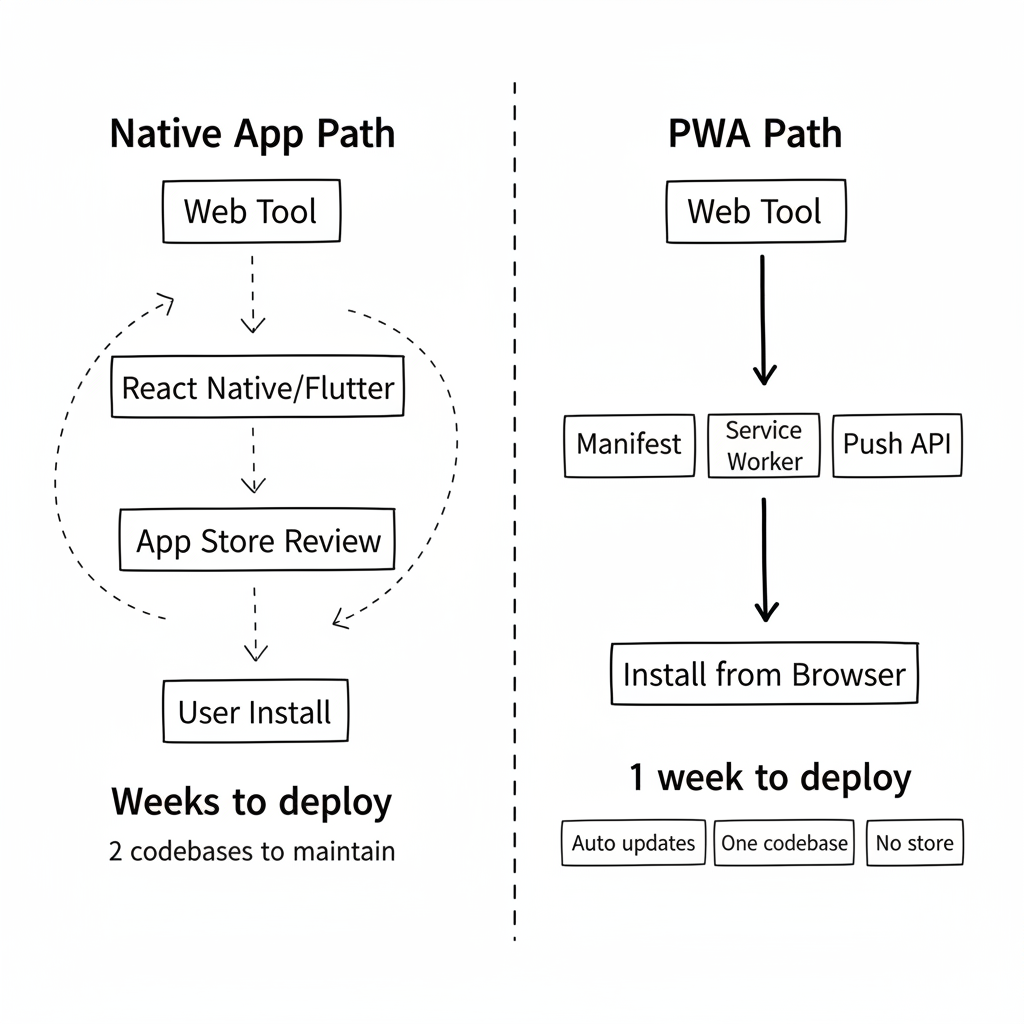
I could have built a React Native app. Or Flutter. Manage two codebases. Go through the stores. Wait for approvals.
Or transform the existing into a PWA.
Why PWA and Not Native
For an internal tool, app stores are a nightmare. Apple demands justifications for "private" apps. Google has its own constraints. Updates take days to propagate.
A PWA means:
- Instant installation from the browser
- Automatic updates on every visit
- One codebase for desktop and mobile
- No store validation for an internal tool
The tradeoff? No access to advanced native APIs (NFC, Bluetooth). For a chatbot, we didn't need those.
Implementation in Three Steps
Step 1: The Manifest
The manifest.json file defines how the app appears once installed. Name, icons, colors, display mode.
{
  "name": "Internal Assistant",
  "short_name": "Assistant",
  "start_url": "/chat",
  "display": "standalone",
  "background_color": "#1a1a2e",
  "theme_color": "#4a90d9",
  "icons": [
    {
      "src": "/icons/icon-192.png",
      "sizes": "192x192",
      "type": "image/png"
    },
    {
      "src": "/icons/icon-512.png",
      "sizes": "512x512",
      "type": "image/png"
    }
  ]
}
display: standalone is crucial. It hides the browser's URL bar. The app looks like a native app.
Step 2: The Service Worker
The service worker handles caching and requests. For our case, I chose a simple strategy: cache the UI, not the data.
// sw.js
const CACHE_NAME = 'assistant-v1';
const STATIC_ASSETS = [
  '/',
  '/chat',
  '/css/app.css',
  '/js/app.js',
  '/icons/icon-192.png'
];

self.addEventListener('install', event => {
  event.waitUntil(
    caches.open(CACHE_NAME)
      .then(cache => cache.addAll(STATIC_ASSETS))
  );
});

self.addEventListener('fetch', event => {
  // Cache-first for static assets
  // Network-first for API calls
  if (event.request.url.includes('/api/')) {
    event.respondWith(fetch(event.request));
  } else {
    event.respondWith(
      caches.match(event.request)
        .then(response => response || fetch(event.request))
    );
  }
});
Chatbot responses always come from the server (network-first). The interface loads from cache (cache-first). Result: the app starts instantly even on slow connections.
Step 3: The Install Prompt
The browser can show an install prompt, but only if we capture it correctly.
let deferredPrompt;

window.addEventListener('beforeinstallprompt', (e) => {
  e.preventDefault();
  deferredPrompt = e;
  showInstallButton();
});

function installApp() {
  if (deferredPrompt) {
    deferredPrompt.prompt();
    deferredPrompt.userChoice.then((result) => {
      if (result.outcome === 'accepted') {
        hideInstallButton();
      }
      deferredPrompt = null;
    });
  }
}
I added an "Install app" button in the menu. Discreet but visible. Curious users click. Others continue on web.
Push notifications
The platform also had an internal forum where consultants could ask questions and tag colleagues or subject-matter experts. Before, mentions generated an email to bring the user back to the app. But an email buried in an overflowing inbox could sit there for hours.
With the PWA, mentions now trigger push notifications. On desktop, these were classic browser notifications. On installed mobile, they become real system notifications.
// Request permission
Notification.requestPermission().then(permission => {
  if (permission === 'granted') {
    subscribeUserToPush();
  }
});

// Receive in service worker
self.addEventListener('push', event => {
  const data = event.data.json();
  self.registration.showNotification(data.title, {
    body: data.body,
    icon: '/icons/icon-192.png',
    badge: '/icons/badge.png'
  });
});
The forum became much more dynamic. Someone tags an expert, the expert gets a notification on their phone, opens the app, responds within minutes. Average response time went from hours to minutes. Engagement skyrocketed — push notifications have a 3x higher open rate than emails.
What I Didn't Do
No full offline mode. Our chatbot needs the server to respond. No cached responses. I just displayed a clean "Connection required" message when network was unavailable.
No background sync. For a chatbot, it doesn't make sense. Messages are synchronous. If we had forms to submit offline, I would have implemented Background Sync.
No App Store. Even though PWAs can be published to stores now, it didn't make sense for an internal tool. Direct installation is enough.
The Results
One week after deployment:
- 100+ installations on employee phones
- Mobile usage went from 5% to 35% of total traffic
- Average response time on the go: same as desktop
- Zero support tickets related to installation
The most surprising: users don't know it's a PWA. They say "the app". It looks like an app. It behaves like an app. For them, it is an app.
The Takeaway
For years, I believed "mobile" meant "native app". That PWAs were a compromise for projects without budget.
I was wrong. For an internal tool, a PWA is often the best choice. Instant installation. Transparent updates. One codebase.
Our teams now access the chatbot from their phones, on the subway, between meetings. Exactly what they wanted. Without going through the App Store. Without waiting for approval. In one week instead of two months.