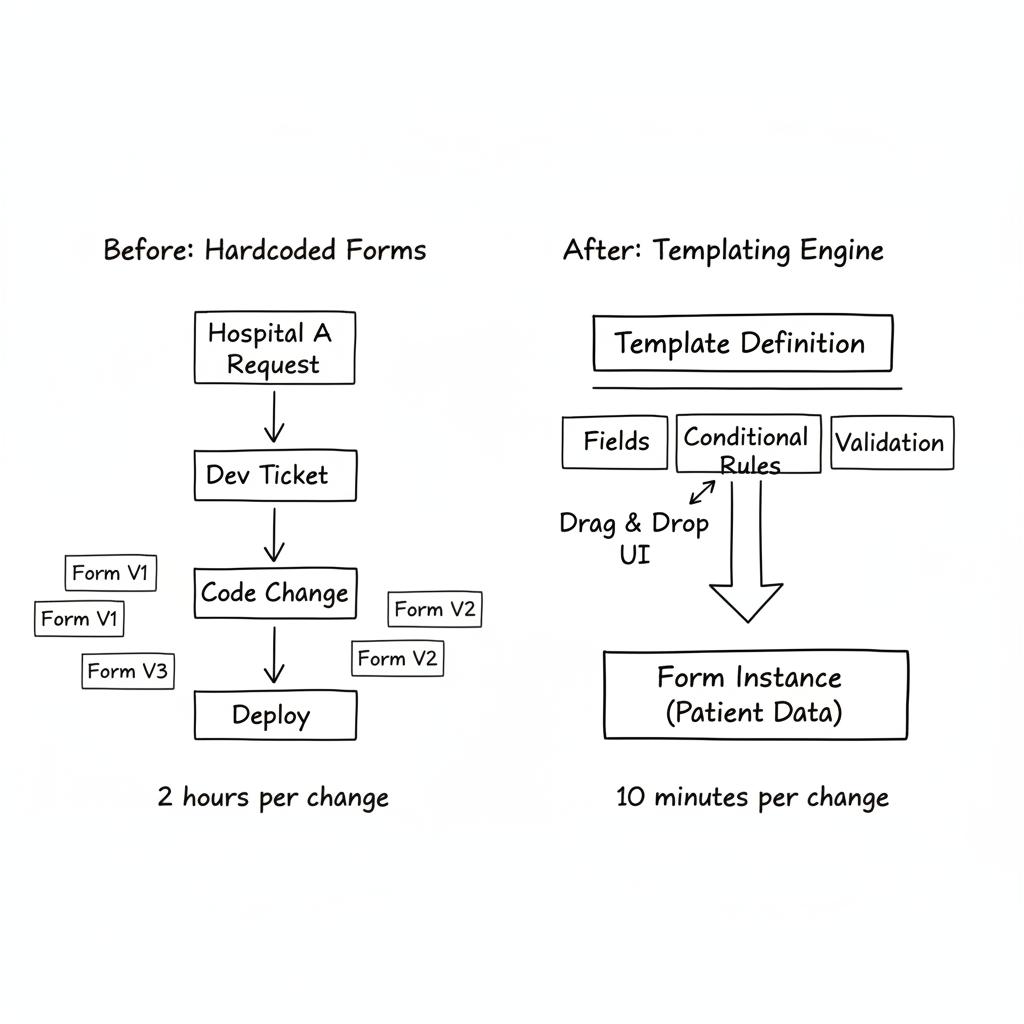
Every hospital had its own forms. Every department its own fields. Every doctor their own preferences.
"Can we add a field for baby weight?" "Our department needs a different form for follow-ups." "This field should only be required if the patient is diabetic."
Tickets piled up. Modifying a consultation template: 2 hours of dev, tests, deployment. Multiply by dozens of requests per week. The technical team spent more time on form modifications than on real features.
I proposed a radical solution: give control to the business users.
The Engine Architecture
The system relies on three concepts: Templates, Fields, and Instances.
A Template defines a form's structure: general consultation, prenatal follow-up, laboratory results. It belongs to a specific hospital or to the shared catalogue.
Fields compose the template: text, number, dropdown, vital signs, Glasgow scale. Each field has validation rules, translations, display conditions.
An Instance is a filled form. Patient data. Values entered by the doctor. Linked to the template that generated it.
class Template(models.Model):
    name = models.CharField(max_length=255)
    medical_act_type = models.CharField(choices=MEDICAL_ACT_TYPES)
    hospital = models.ForeignKey(Hospital, null=True)  # null = shared catalogue
    version = models.IntegerField(default=1)
    is_active = models.BooleanField(default=True)

class TemplateField(models.Model):
    template = models.ForeignKey(Template, related_name='fields')
    name = models.CharField(max_length=255)  # Technical name
    label_fr = models.CharField(max_length=255)
    label_en = models.CharField(max_length=255)
    field_type = models.CharField(choices=FIELD_TYPES)
    required = models.BooleanField(default=False)
    step = models.IntegerField(default=1)  # For multi-step forms
    order = models.IntegerField(default=0)
    validation_rules = models.JSONField(null=True)
    conditional_rules = models.JSONField(null=True)
Field Types
The system supports over 30 field types. From basic to highly specialized.
Basic fields: text, textarea, number, decimal, date, datetime, checkbox, select, multiselect.
Medical fields: vital signs (one field = blood pressure, pulse, temperature, saturation), pain scale, Glasgow score, laboratory results with reference values.
Advanced fields: dynamic tables, repeatable groups (for multiple births), integrated appointment booking.
Each type has native validation. A vital_signs field automatically validates that systolic pressure is between 60 and 250 mmHg. A glasgow_coma_scale field calculates the total score from three components.
FIELD_TYPES = [
    ('text', 'Short text'),
    ('textarea', 'Long text'),
    ('number', 'Integer'),
    ('decimal', 'Decimal number'),
    ('date', 'Date'),
    ('select', 'Dropdown'),
    ('vital_signs', 'Vital signs'),
    ('glasgow_coma_scale', 'Glasgow Coma Scale'),
    ('lab_test_result', 'Laboratory result'),
    ('table', 'Dynamic table'),
    # ... 20+ other types
]
Conditional Logic
This is where the system becomes powerful. Fields can appear or become required based on other fields' values.
{
  "conditional_rules": {
    "visible_if": {
      "field": "is_diabetic",
      "operator": "equals",
      "value": true
    },
    "required_if": {
      "field": "glucose_level",
      "operator": "not_empty"
    }
  }
}
Supported operators: equals, not_equals, in, not_in, contains, not_empty, is_empty.
The frontend evaluates these rules in real-time. The "Glycemic monitoring" field only appears if "Diabetic patient" is checked. The backend validates the same rules on submission. Double verification.
Multi-Tenant Isolation
Three hospitals use the platform. Each has its own templates. But some templates are shared (common catalogue).
class Template(GlobalWithHospitalMixin):
    hospital = models.ForeignKey(Hospital, null=True, blank=True)

    def is_shared_template(self):
        return self.hospital is None

    def is_available_to_hospital(self, hospital):
        if self.is_shared_template():
            return True
        return self.hospital == hospital
A shared template (hospital=null) is visible to all. A specific template is only visible to its hospital.
Hospital administrators can clone a shared template to customize it. The clone belongs to their hospital. Modifications don't affect others.
Versioning
Templates evolve. But existing instances must remain consistent.
Each major modification creates a new version. The old version stays active for ongoing instances. New instances use the latest version.
def clone_to_new_version(self, user=None):
    new_template = Template.objects.create(
        name=self.name,
        medical_act_type=self.medical_act_type,
        version=self.version + 1,
        hospital=self.hospital,
        created_by=user
    )

    # Clone all fields
    for field in self.fields.all():
        TemplateField.objects.create(
            template=new_template,
            **field.get_clonable_data()
        )

    return new_template
The interface shows all versions, allows switching between them, activating an old version if needed.
The Admin Interface
Drag-and-drop is handled on the frontend with Vue and vue-draggable-plus. The administrator sees:
- Step list (form sections) on the left
- Fields for selected step in the center
- Properties for selected field on the right
They can reorganize fields by drag-and-drop. Create new steps. Configure conditional rules via a visual form (no JSON to write).
A "JSON" tab allows advanced users to directly edit the structure. Useful for imports/exports or bulk modifications.
What This Changed
Before: every form modification required a ticket, a dev, a deployment.
After: the hospital administrator modifies the template, saves, it's in production.
- Average modification time: 2 hours → 10 minutes
- "Modify a field" tickets: -90%
- New templates created by business users: 15+ in 3 months
- Each hospital has workflows adapted to their reality
Doctors no longer depend on the technical team to customize their tools. They experiment. They iterate. They adapt forms to their patients.
The Takeaway
For months, I coded forms by hand. Every modification was a ticket. Every hospital wanted variants. The technical team became a bottleneck.
The templating engine reversed the dynamic. Business users have control. Devs focus on real features. Workflows adapt to real field needs.
It's the no-code principle applied to business forms. No magic. Just a configuration system expressive enough to cover 95% of needs. The remaining 5% still go through code. And that's perfectly fine.